Currently, there is no whitespace control in Zensical templating.
The result is tons of spaces and newlines in the generated HTML pages which makes them difficult to read.
See 2026-06-24-zensical-whitespace-control-in-minijinja-templates.
The developers do not intend to fix or optimize this directly. Instead they will enable minification of generated pages as default for post-processing actions.
For debugging you will have to inspect the HTML source via the browser's web developer tools (CTRL + SHIFT + I). Just displaying the page source (CTRL + U) is no longer of use.
For websites, that do not block CDN or inline scripts via CSP you can use your own "view-source" via browser bookmarklet with:
- htmlfy CDN by jsDelivr - A CDN for npm and GitHub from j4w8n/htmlfy: prettify or minify html. Used by webdriverio
- highlight.js CDN by jsDelivr - A CDN for npm and GitHub from highlightjs/highlight.js: JavaScript syntax highlighter with language auto-detection and zero dependencies.
uses/html
Details
Limitations
[!FAIL] Do not use SRI in the bookmarklet because this will break all sites that don't have CORS enabled.
Example: Using
<link rel="stylesheet" href="https://cdn.jsdelivr.net/npm/highlight.js@11.11.1/styles/atom-one-dark.min.css" integrity="sha256-Qjf/ynzmqttDjEV+CmdbElxTS73aW4f0HzoUlWA7zJs=" crossorigin="anonymous"></link>
on a Stack Overflow page results in:
Subresource Integrity: The resource 'https://cdn.jsdelivr.net/npm/highlight.js@11.11.1/styles/atom-one-dark.min.css' has an integrity attribute, but the resource requires the request to be CORS enabled to check the integrity, and it is not. The resource has been blocked because the integrity cannot be enforced.
[!FAIL] You cannot load the highlighting style if the website restricts the
style-srcvia CSP.
Example from GitHub:
Loading the stylesheet 'https://cdn.jsdelivr.net/gh/highlightjs/cdn-release@11.11.1/build/styles/dark.min.css' violates the following Content Security Policy directive: "style-src 'unsafe-inline' github.githubassets.com". Note that 'style-src-elem' was not explicitly set, so 'style-src' is used as a fallback. The action has been blocked.
[!NOTE] Because
'unsafe-inline'is allowed for styles, this error could be resolved by copying the css code directly into the bookmarklet. However, that does not help because for the scripts, neither fetching CDN nor inline is allowed.[!FAIL] You cannot load the script files if the website restricts
script-srcvia CSP.
Example from GitHub:
Executing inline script violates the following Content Security Policy directive 'script-src github.githubassets.com'. Either the 'unsafe-inline' keyword, a hash ('sha256-6mEjqElm457kvteKTXfqSijYU4MojnShE2zwhGz2ZmI='), or a nonce ('nonce-...') is required to enable inline execution. The action has been blocked.
[!FAIL] You cannot off-load the highlighting and formatting to a different page when CORS ' same-origin' is enforced.
Example from GitHub:
SecurityError: Failed to read a named property 'document' from 'Window': Blocked a frame with origin "https://gist.github.com" from accessing a cross-origin frame.
CSP and CORS
When using window.open(), the new tab is opened with the context of about:blank. However, because this does not have a origin on its own, this tab inherits the origin (and a lot more) from the source.
That is the reason why a blank tab opened from gist.github.com has the same CSP settings. If GitHub does not allow CDN targets, your blank tab cannot fetch them either.
The CSP settings of a page might prevent us from getting anything "in". Like our highlighting styles and formatting scripts.
If you instead use window.open("https://example.com"), the new tab will be opened with a different context. This does prevent the CSP settings from "spilling over". Choosing a target without CSP will allow us to fetch our files from the CDN.
However, now we no longer share the same origin.
If our source origin requested that CORS should be enforced for it with same-origin, we can not access the new window to add the HTML content e.g. for the highlighting there. It will be blocked as cross-origin access attempt.
The CORS settings of a page might prevent us from getting anything "out". Like our HTML source text for formatting and highlighting it.
More reading: Same-origin policy - Security | MDN, Cross-Origin-Opener-Policy (COOP) header - HTTP | MDN
Remember, all of this happens within your browser. CSP and CORS are browser security measures to protect you from executing malicious client-side code. The website / webserver does not care about any of this. More precisely, it cannot care, because it is not even involved (read: there is no communication or data transfer with the original website if you decide to add some style or script locally). The website only transmits the rules to the browser like this:
Hey browser, if you want to protect the user, I suggest you use the following rules for CSP and CORS for my sites...
If you use a browser that does not support CSP or CORS (or does not enforce them), none of the limitations, restrictions or failures discussed in this document are relevant. The browser will load everything and transfer everything.
Sounds great, but of course it goes the other way around as well. If you visit a compromised (or malicious) website with that browser, everything will load (i.e. executing dangerous inline or remote code) and everything will transfer (i.e. sending content and information to malicious recipients / servers around the globe). That's the XSS feast of the old days of the internet and we really don't want to go back there.
window.open(url)
More reading: Window: open() method - Web APIs | MDN
When
window.open()creates a new browsing context (i.e., when no existing window with that name is found), the window initially containsabout:blank. If a different URL was provided, it is loaded asynchronously,
If you var handle = window.open(url), you must add a step to wait for the loading to finish. handle will always be about:blank first.
There is no direct way to wait (note to self: await did not work on window.open()). Instead you might need to hack a timeout into your script. Adjust the figures depending on how long the target page is supposed to load.
var windowObjectReference;
(() => { windowObjectReference = window.open("https://example.com") })();
(async function () {
  await new Promise(r => setTimeout(r, 2000));
  console.log(windowObjectReference.location);
  var doc = windowObjectReference.document;
  doc.title = "Test"
})();
[!NOTE] This example is just a PoC for the timeout. It will not work on a website with CORS enabled because the calling window cannot access any properties of the cross-origin
windowObjectReference.
Shadow DOM
Creating the HTML elements in a shadow DOM does not help with the limitations mentioned in this document because the CSP of the main document applies to the shadow DOM as well.
<!DOCTYPE html>
<html lang="en">
<head>
    <meta charset="UTF-8">
    <meta http-equiv="Content-Security-Policy" content="default-src 'self'; script-src 'self' https://example.com;">
    <title>Shadow DOM Example</title>
</head>
<body>
    <div id="host"></div>
    <script>
        const host = document.querySelector("#host");
        const shadow = host.attachShadow({ mode: "open" });
        shadow.innerHTML = `<p>Hello from the Shadow DOM!</p>`;
    </script>
</body>
</html>
Style
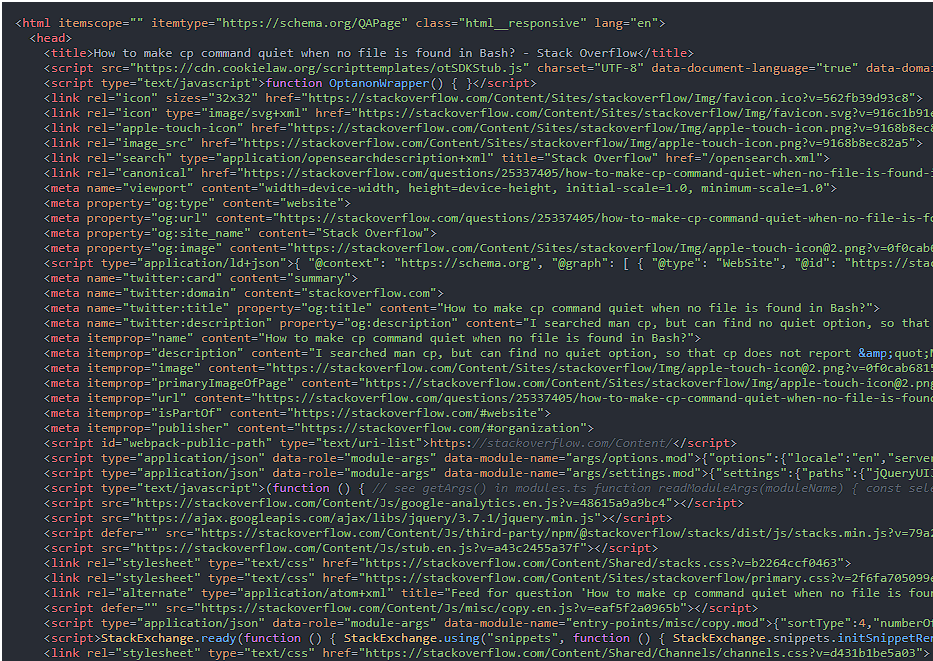
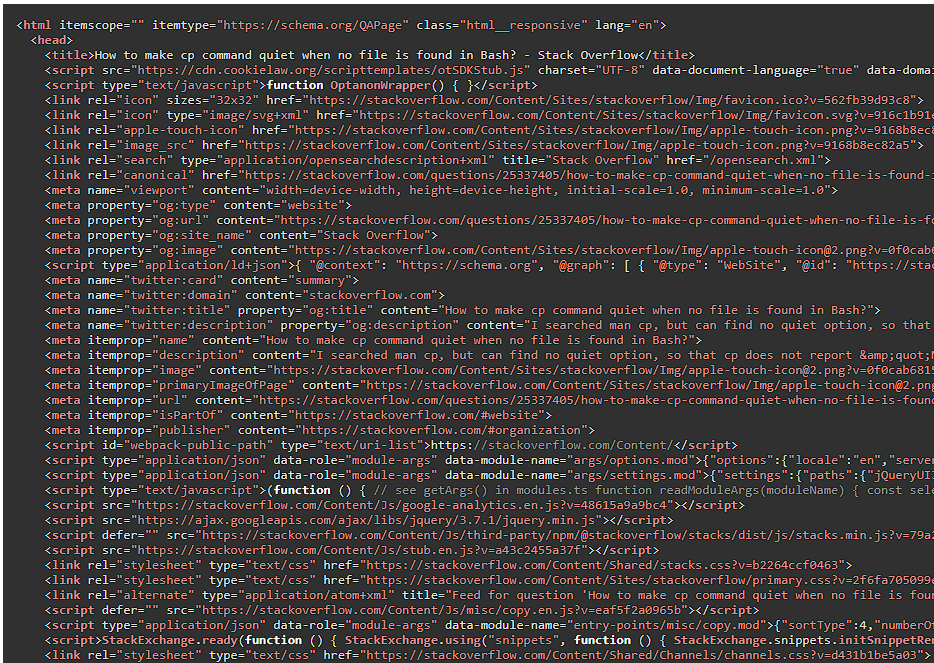
Use atom-one-dark.min.css instead of dark.min.css. It is the most used style by far (according to the CDN download statistics) and it looks way better:
| atom-one-dark.min.css | dark.min.css |
|---|---|
 |
 |